Clipik: save YouTube videos, take notes and never lose what you learned
We have all been there: we find a YouTube video that explains exactly what we needed to learn, we save it to watch later and, a few weeks on, it is buried under dozens of videos, Shorts, screenshots and links sent over WhatsApp.
Even when we do get round to watching it, another problem appears. We remember the video was interesting, but not why. We don’t know at which minute the key explanation was, which idea we wanted to apply or where we stopped watching.
Clipik was created to stop that knowledge from getting lost.
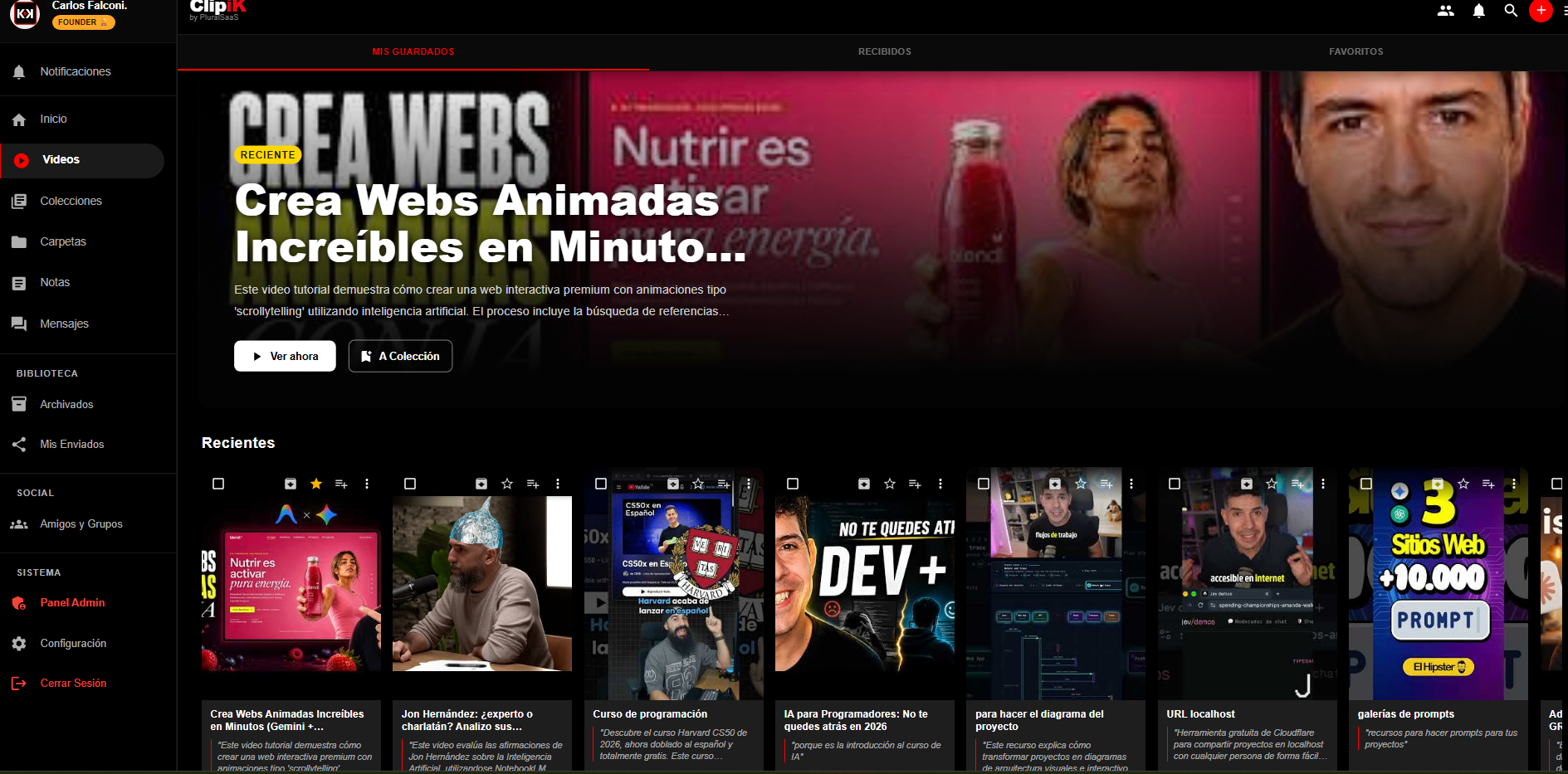
It is an app designed for people who use YouTube to learn and need something more useful than an endless list of saved videos. It lets you keep interesting videos and Shorts, organise them, add notes and remember why each piece of content mattered when you decided to save it.
The goal is not to make the user watch more videos, but to help them get more out of the ones that can really add something.
From watching videos to building a knowledge library
YouTube has become one of the largest learning resources available. On the platform we can find programming tutorials, language lessons, financial analysis, science explainers, recipes, interviews, professional training and solutions to almost any problem.
However, YouTube is designed mainly to play and recommend content. Saving a video to a playlist is not always enough to turn it into knowledge we can find and use again.
Clipik adds the missing layer of organisation between watching a video and actually learning from it.
When the user finds relevant content, they can save it in Clipik, file it in a folder or collection and attach a note explaining why it is worth keeping.
Instead of coming across a title months later that they no longer remember, they can leave messages such as:
- “This explains how to structure an ad campaign.”
- “I want to try this technique in the next project.”
- “Continue from minute 14.”
- “The key comparison starts at 08:30.”
- “This Short sums up an idea for the course.”
- “Share this part with the team.”
The video stops being just a link and starts to have context.
Timestamped notes to jump back to the exact moment
One of Clipik’s most useful features is the ability to create notes linked to specific moments in the video.
If a lesson lasts an hour, there is no need to go through it again to find a two-minute explanation. The user can save a note with its timestamp and go straight back to the relevant point.
This is especially useful for:
- Students following lessons and tutorials.
- Developers looking up technical solutions.
- Professionals researching tools and methodologies.
- Creators analysing references for their content.
- Entrepreneurs studying marketing, sales or management.
- Teams sharing internal training videos.
- People who use YouTube to teach themselves.
Notes let you record ideas, questions, conclusions and pending actions while the content is still fresh in your mind.
Know where you left off and why you saved the video
We often start a video, watch part of it and leave it because we have to do something else. When we come back, we don’t remember where we stopped or what we had understood so far.
Clipik lets you add notes that work like a small map of your learning:
- Which part you have already watched.
- Where you should continue from.
- Which concepts were important.
- Which questions are still open.
- What you want to apply later.
- Who you would like to share it with.
This context turns the app into an external memory for video content.
You no longer depend on remembering that “there was a really good video on that topic”. You can find it, immediately understand why you saved it and go back to the moment that really interests you.
Organise videos and Shorts by topic
A single playlist ends up mixing completely different subjects. An editing tutorial can appear next to an interview, a recipe, an explanation of artificial intelligence and several videos saved out of curiosity.
Clipik lets you build a personal library organised into folders and collections.
For example, a user could create spaces such as:
- Artificial intelligence.
- App development.
- Marketing and sales.
- Courses to finish.
- Content ideas.
- Personal finance.
- Training.
- Languages.
- Videos to share with the team.
- References for a project.
This organisation reduces the time lost searching for content and makes it easier to pick a topic up again.
Instead of starting from scratch every time we want to learn something, we can keep building on the videos, notes and references we had already saved.
Learn and collaborate with other people
Learning is not always individual. We often find a video that could help a colleague, serve as a reference for a client or start a conversation within a team.
Clipik lets you share videos and collections, and hold conversations about the content.
A team can gather materials to prepare a project. A group of students can organise the lessons for a subject. A creator can share references with their collaborators. A company can build a small video library for internal training.
The video no longer travels as an isolated link; it comes with notes, context and conversations explaining why it matters.
A companion to YouTube, not another video platform
Clipik is not trying to replace YouTube. Its role is to complete the experience.
YouTube lets you discover and play content. Clipik helps you select it, organise it, comment on it and turn it into a reference you can find again later.
The process is simple:
- You find an interesting video or Short on YouTube.
- You save it to Clipik using the share option.
- You file it in a folder or collection.
- You add a note to remember why it matters.
- You mark specific moments with timestamps.
- You come back when you need to continue or apply what you learned.
- You share it with other people if it could be useful to them.
This way, the user stops piling up videos to watch and starts building a personal knowledge library.
The problem Clipik solves
The problem is not a lack of content. We have access to more educational videos than we could watch in a lifetime.
The real problem is keeping the context.
We save too much, organise too little and quickly forget what we wanted to learn. Lists grow, but the knowledge does not always stay.
Clipik was designed to close that gap between consuming information and being able to use it later. It helps you save less content without context and better keep what is really worth it.
Who is Clipik designed for?
Clipik can be especially useful for:
- People who regularly learn with YouTube videos.
- Students who need to take notes on video content.
- Self-learners following different courses and tutorials.
- Professionals who are constantly researching.
- Creators who save references and ideas.
- Teams that share training materials.
- Users who pile up lists of videos to watch.
- People who want to cut down on passive content consumption.
It is not just an app for saving videos. It is a tool for keeping the ideas we find inside them.
From an interesting video to an idea you can get back
The value of a video does not lie in having watched it, but in what we can remember, apply or share afterwards.
Clipik turns scattered videos and Shorts into an organised library with notes, timestamps and context. It lets you know what you saved, why you saved it, where you stopped watching and which part deserves your attention.
Instead of letting knowledge disappear into your YouTube history, Clipik helps turn it into something you can get back when you really need it.
Clipik
What it is about
App to save YouTube videos, add notes and get back what you learned.
Clipik
Apps en App Store
Tech stack
- React 19
- Vite 7
- Material UI 7
- Capacitor 8
- Firebase 12
- Firestore
- Cloud Functions
- Node.js 20
- PWA