Analysis and real experience
Mi experiencia trabajando con IA
Lenovo Yoga Slim 7 with 32 GB: my experience working with AI and coding agents
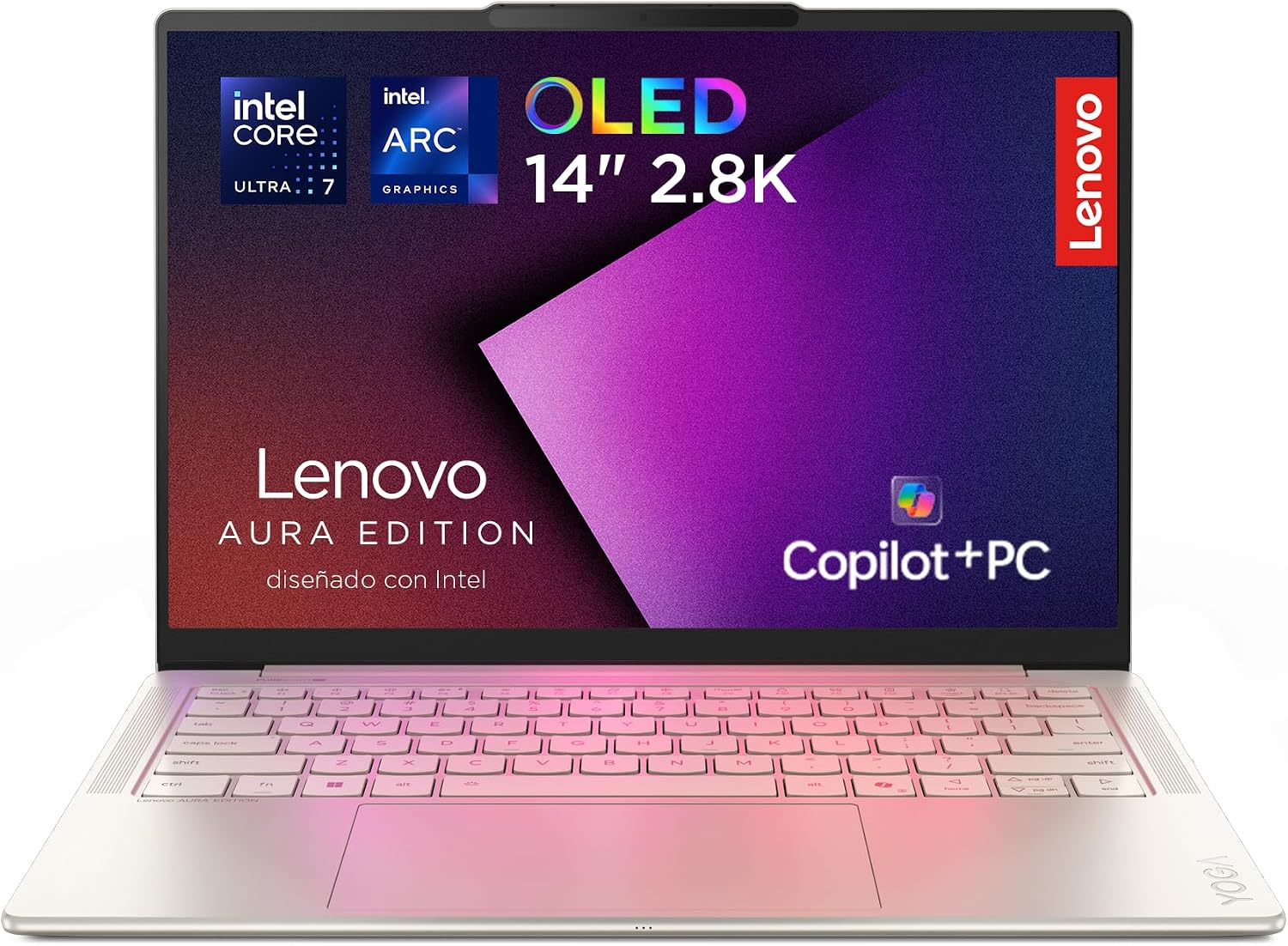
After trying several computers, the Lenovo Yoga Slim 7 with 32 GB of RAM was the first one that let me work with different artificial intelligence tools, coding agents and apps open at the same time without worrying about closing processes.
Before I tell you about my experience, here are the main specifications of the laptop we are reviewing.
Lenovo Yoga Slim 7: main technical specifications
| Feature | Specification |
|---|---|
| Processor | Intel Core Ultra 7 258V |
| RAM | 32 GB LPDDR5X |
| Storage | 1 TB SSD |
| Screen | 14-inch OLED |
| Graphics | Integrated Intel Arc 140V |
| AI processing | Intel AI Boost NPU up to 47 TOPS |
| Operating system | Windows 11 Home |
| Wireless connectivity | Wi-Fi 7 and Bluetooth |
| Main ports | USB-A, Thunderbolt 4, HDMI and audio jack |
| Approximate weight | From 1.19 kg |
| Recommended use | Programming, productivity, content creation and AI tools |
What matters most for working with AI
Its 32 GB of RAM let you keep the browser, several AI agents, the code editor, terminals and development servers open with much more headroom.
The memory is soldered and cannot be upgraded later. If you are torn between the 16 GB and 32 GB versions for intensive professional use, make this decision before you buy.
Check the Lenovo Yoga Slim 7 with 32 GB on Amazon
Why I ended up changing computers three times
For months I thought my problem was the browser, a poorly optimised app or even the way I worked.
I would open several AI tools, set some agents to analyse information and others to write code and, before long, the computer would start to slow down.
First came small delays. Then windows took a while to respond, switching from one app to another became awkward and, in the end, the whole system seemed to get stuck.
I tried three computers before arriving at the Lenovo Yoga Slim 7. Among them were an HP laptop and a Mac mini with 16 GB of memory.
Both could handle many tasks perfectly well, but they couldn’t smoothly keep up with my way of working when I piled up several tools, projects and processes at once.
The Lenovo didn’t magically make every task instant, but it was the first machine I could work with like this without constantly closing apps or waiting for the system to respond.
What laptop do you need to work with artificial intelligence?
When people look for a laptop to work with AI, they usually look first at the processor or at the label saying the computer has artificial intelligence features.
However, before choosing a machine it is worth being clear about what working with AI really means.
Using ChatGPT, Claude, Gemini or Codex over the internet is not the same as running a language model directly on the computer. Nor does someone who occasionally generates an image have the same needs as someone who keeps several conversations, a code editor, terminals, documentation and development servers open.
In my case, my usual work can include all at once:
- Several browser tabs with different AI models.
- Agents analysing long documentation.
- One or more agents writing and reviewing code.
- Visual Studio Code and several terminals open.
- Local servers to check changes to a website.
- Design, email and project management tools.
- Video calls and media playback.
The models I use through the browser normally run on external servers. This means the Lenovo isn’t processing the whole ChatGPT or Claude model on its own.
Even so, every app uses resources. Browsers, editors, development environments, terminals and local processes end up adding up to a considerable load.
That is where the 32 GB of RAM have made the difference in my experience.
Why 16 GB of RAM can fall short when working with AI
A computer with 16 GB is still enough for a great many people. It lets you browse, work with documents, use AI tools and do programming tasks.
The problem appears when all those activities happen at the same time.
The operating system already takes up part of the memory. Then come the browser and its tabs, the code editor, Electron-based apps, local servers and the processes the agents start up.
When available memory starts to run out, the computer uses storage as backup. Although a modern SSD is fast, it isn’t as fast as RAM.
The result can be felt in several ways:
- Small freezes when switching apps.
- Browser tabs that have to reload.
- Windows that take a while to respond.
- Fans running more often.
- Processes that seem to stall for a few seconds.
- Less fluidity when using several agents at once.
That is what often happened to me. There wasn’t always an error message clearly explaining the problem. I simply noticed that the computer could no longer keep up with me.
With 32 GB I have more headroom to keep open the tools that are part of my work without constantly deciding which process to close.
The advantage of 32 GB isn’t just finishing a task faster. It is keeping a complex working environment running without every app starting to fight for memory.
My experience with the Lenovo Yoga Slim 7 working with AI agents
What I have noticed most since I started using the Lenovo Yoga Slim 7 is continuity.
I can ask one agent to review a project while another works on the code. While those processes keep running, I can check documentation, look at the result in the browser or prepare other content without feeling that I am constantly pushing the computer to its limit.
To develop FEIDERS, for example, I don’t use a single app.
The work involves browsing the platform, reviewing designs, opening the project, running development tools and holding long conversations with different assistants.
Each of those tasks on its own may seem light. The problem is how they pile up over several hours.
In this scenario, the 32 GB matter more to me than a small speed difference between two similar processors. The extra memory keeps the workflow stable and reduces the interruptions that end up breaking concentration.
What the Lenovo Yoga Slim 7 offers besides its 32 GB
The selected version combines 32 GB of RAM with an Intel Core Ultra 7 processor, a 1 TB SSD and integrated Intel Arc graphics.
It is a combination geared towards productivity, mobility and multitasking.
Intel Core Ultra 7 processor
The processor runs the operating system, the apps and a good part of the processes needed to work.
It offers a good balance between performance and power consumption, which is especially important in a thin and light laptop.
It isn’t designed to compete with a desktop workstation, but it performs well for programming, heavy browsing, productivity and content creation.
32 GB of LPDDR5X memory
For the way I work, memory is one of the most important components of the machine.
It lets you keep more apps open and reduces the need to use the SSD as temporary memory when the system starts to run out of RAM.
For someone using several AI agents, the jump from 16 to 32 GB can be more noticeable than a small improvement in processor speed.
1 TB SSD storage
Projects, development dependencies, images, videos and local copies can take up a lot of space.
Having 1 TB saves you from having to start managing or deleting files shortly after buying the computer. It also lets you keep different projects and development environments without constantly relying on external drives.
14-inch OLED screen
The OLED screen offers deep blacks, good contrast and a particularly pleasant image for working with interfaces, design and media.
The 14-inch size strikes a good balance between workspace and portability. It doesn’t replace a large monitor when I work for many hours at a desk, but it lets me carry the computer easily.
Integrated Intel Arc graphics
Intel Arc graphics can handle visual tasks, media playback, light editing and certain accelerated workloads.
However, they shouldn’t be confused with a high-end dedicated graphics card. This Lenovo isn’t a gaming laptop or a workstation designed to train large artificial intelligence models.
NPU for artificial intelligence features
The laptop includes an NPU, a component designed to accelerate certain compatible AI tasks.
It can be used for local features such as camera effects, transcription, recognition and some Windows tools.
However, the NPU doesn’t automatically make ChatGPT or Claude respond faster. When we use these services over the internet, most of the processing happens on each platform’s servers.
Can the Lenovo Yoga Slim 7 run AI models locally?
Yes, but with limits.
The 32 GB of memory let you experiment with certain small or quantised local models. They also help when using programming tools that download and process information on the machine itself.
However, this Lenovo Yoga Slim 7 doesn’t have a dedicated NVIDIA graphics card with a large amount of video memory.
That is why I wouldn’t buy it mainly to:
- Train large artificial intelligence models.
- Run the most demanding language models locally.
- Generate video intensively.
- Render complex 3D projects.
- Replace a workstation with a dedicated GPU.
- Use it as a high-performance gaming laptop.
Its strength lies elsewhere: offering a portable, balanced environment for working with AI services, coding agents, automation, programming, content and professional multitasking.
Advantages of the Lenovo Yoga Slim 7 for working with AI
After using it in my daily work, these are the points I consider most relevant:
- 32 GB of RAM to work with many apps open.
- Good performance for programming and productivity.
- 1 TB SSD with enough space for projects and files.
- Good-quality OLED screen.
- Thin design that is easy to carry.
- Quiet operation during many everyday tasks.
- Efficient processor for working on battery.
- NPU compatible with certain local AI features.
- Enough ports to connect a monitor or peripherals.
- Windows and x86 architecture, with broad app compatibility.
Things to consider before buying it
My experience has been good, but that doesn’t mean it is the right laptop for everyone.
Before choosing it, consider the following:
- The memory is soldered and cannot be upgraded.
- It doesn’t replace a computer with a dedicated GPU for very demanding graphics work.
- Real battery life will depend on brightness and the apps used.
- The OLED screen can use more power in some situations.
- It has no number pad because of its 14-inch size.
- Large local models will still need a more powerful machine.
- If you only use ChatGPT occasionally, you probably don’t need 32 GB.
The key is to buy it for the work you need to do, not simply because it is advertised as an AI-ready computer.
Who do I recommend this laptop for?
The Lenovo Yoga Slim 7 with 32 GB can be a particularly good fit for:
- Developers who work with coding agents.
- Professionals who use several AI tools at the same time.
- People who keep many tabs and apps open.
- Entrepreneurs who manage different projects.
- Marketing and content creation professionals.
- Designers who value a good screen and portability.
- Users who need Windows and compatibility with development tools.
- People looking for a light laptop without giving up 32 GB of memory.
On the other hand, if you only use the browser, answer emails, work with documents and use ChatGPT occasionally, a computer with 16 GB may be enough.
Do I recommend the Lenovo Yoga Slim 7 for working with AI?
In my case, yes.
After going through several machines, the Lenovo Yoga Slim 7 with 32 GB was the first one that let me work with several agents, apps and projects without constantly adapting my way of working to the computer’s limitations.
I wouldn’t recommend it simply because its specifications include the word “AI”.
I recommend it because its 32 GB of memory, its 1 TB of storage, its portability and the balance of the whole package meet a very specific need: working with lots of artificial intelligence tools without the computer becoming the main obstacle.
My conclusion
If you use artificial intelligence as an occasional tool, you probably don’t need a machine like this.
If it is part of your working day and you work at the same time with agents, code, browsers, servers and management tools, 32 GB can make a real difference.
Check out the Lenovo Yoga Slim 7
You can check its price, availability and purchase conditions directly on Amazon:
See the Lenovo Yoga Slim 7 with 32 GB on Amazon
Affiliate notice
This content may include an affiliate link. If you buy the product through that link, FEIDERS may receive a commission at no extra cost to you.