Analysis and real experience
Mi experiencia con la DJI Osmo Pocket 4 para grabar vídeos de YouTube y cursos
I could record my videos with an iPhone 16 Pro. Its camera has more than enough quality to create content, but using my personal phone as my main camera was starting to become awkward.
I had to set up the tripod, check the framing, control the audio and leave the phone tied up for the whole recording. On top of that, every time I wanted to make a video I had to temporarily turn my phone into a piece of studio equipment.
That is why I started looking for a standalone camera designed specifically for recording video.
I wasn’t looking for cinema gear, and I didn’t want to learn dozens of settings before publishing my first course. I needed something small, easy to set up and able to deliver professional image and sound without too much hassle.
After comparing several options, I chose the DJI Osmo Pocket 4 Creator Combo.
What does the DJI Osmo Pocket 4 Creator Combo include?
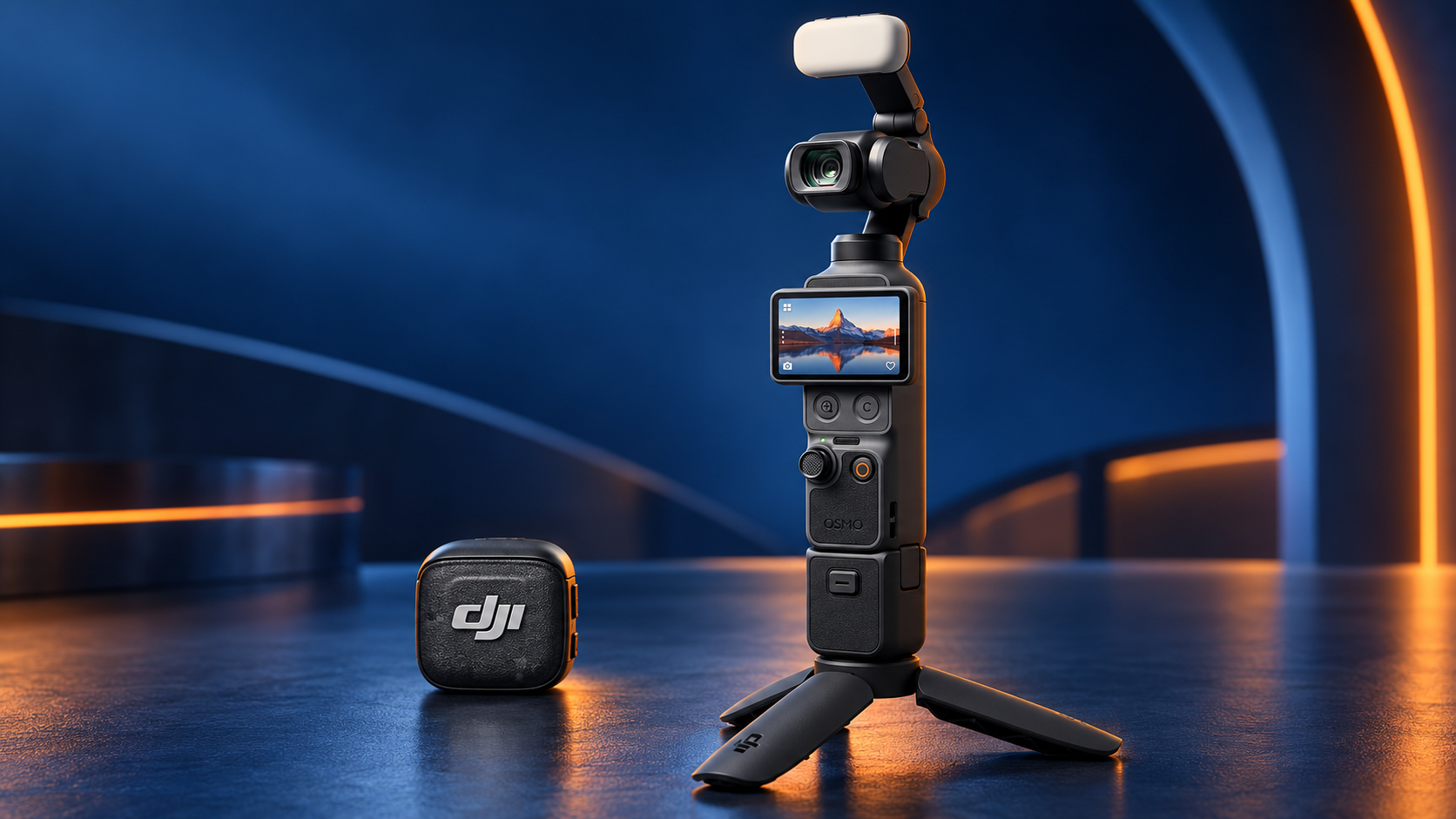
Before reviewing the camera, it is worth being clear about what comes in the Creator Combo, because some of its accessories were decisive for me.
What’s in the box
- DJI Osmo Pocket 4
- DJI Mic 3 wireless transmitter
- Magnetic clip for the DJI Mic 3
- Magnet for the DJI Mic 3
- Two windscreens for the microphone
- Magnetic charging cable for the transmitter
- Fill light for the Osmo Pocket 4
- Wide-angle lens
- Osmo mini tripod
- Handle with a 1/4-inch thread
- Clamp to protect the gimbal
- Wrist strap
- USB-C to USB-C cable
- Carrying bag
- Portable carrying case
What matters most for a beginner is not getting lots of accessories, but avoiding having to work out separately which microphone, mount or connection they need to get started.
The Creator Combo brings together in a single purchase the camera, the microphone, the mini tripod, the lighting and the accessories you need to start recording.
DJI Osmo Pocket 4: main features
| Feature | Specification |
|---|---|
| Sensor | 1-inch CMOS |
| Video resolution | Up to 4K |
| Slow motion | Up to 4K at 240 fps |
| Stabilisation | Three-axis mechanical gimbal |
| Screen | 2-inch rotating touchscreen |
| Tracking | ActiveTrack and smart focus |
| Colour | 10-bit D-Log |
| Dynamic range | Up to 14 stops |
| Internal storage | 107 GB |
| Connectivity | USB-C, Wi-Fi and Bluetooth |
| Webcam use | Supported via USB-C connection |
| External audio included | DJI Mic 3 transmitter |
For the way I work, the three most important features are the built-in gimbal, the wireless microphone and the ability to connect it to the computer.
Why I wanted a camera for YouTube instead of using the iPhone
The iPhone 16 Pro can produce excellent videos. My decision to buy another camera wasn’t because the phone had poor quality, but because I needed a dedicated tool.
When you use your personal phone to record, you are also using the device where you get messages, calls and notifications.
It is the same phone you may need to check a script, control another app or communicate while you prepare the video.
Having a standalone camera lets me keep those two things apart.
When I want to record, I set up the Osmo Pocket 4, connect the microphone and know that the device is dedicated solely to video. My phone stays available and I don’t have to reorganise everything every time I want to create content.
That difference may seem small, but it helps a lot in turning recording into a repeatable process.
A dedicated tool doesn’t always produce better videos automatically, but it can make it much easier for you to actually record them.
An easy camera for someone who doesn’t know much about video
I’m not an expert in cameras, lighting or sound. That is exactly why I needed equipment that didn’t force me to become an audiovisual technician before I could start recording.
The DJI Osmo Pocket 4 combines a compact camera with a three-axis mechanical gimbal.
This gimbal compensates for part of your movement and helps you get smoother footage without an external stabiliser.
It also has a rotating touchscreen and automatic tracking features. This makes it easier to film yourself because the camera can keep the subject in frame while it moves.
Its 1-inch CMOS sensor, 4K recording and built-in gimbal make a particularly practical combination for creators who want to improve quality without large equipment.
4K recording at 240 frames per second is available specifically in slow-motion mode. For my educational videos I don’t usually need that setting, but it can be useful for B-roll or special sequences.
For my YouTube videos and courses, what matters is not always using the highest possible quality.
What is really useful is being able to:
- Turn on the camera.
- Connect the microphone.
- Check the framing.
- Adjust the light.
- Start recording.
All of this can be done without packing a backpack full of gear.
Why the DJI Mic 3 included in the Creator Combo matters
A good image loses much of its value when the sound is bad.
In educational videos, the voice is even more important. Viewers can accept lighting that could be better, but it is hard to follow an explanation with noise, echo or constant volume changes.
The DJI Mic 3 transmitter included in the pack can connect directly to the camera. This saves you from having to buy another audio system straight away or running cables around your desk.
The magnetic clip makes it easy to attach to your clothes, and the windscreens help when recording outdoors.
For my videos, being able to set up the camera and microphone as a single system makes the process much simpler.
The camera can also keep ambient sound through its internal microphones. When a compatible transmitter is connected, the Osmo Pocket 4 can record your voice and the ambient sound separately, giving you more options when editing.
This doesn’t mean the audio will be perfect in any room.
Distance, echo, furniture and outside noise still have an effect. However, the included microphone offers a much better starting point than relying only on sound captured from a camera placed several metres away.
How I connect the DJI Osmo Pocket 4 to the computer
Another especially useful feature is the ability to connect the camera to the computer via USB-C.
The Osmo Pocket 4 can work as a webcam. By connecting it to the computer and selecting that mode, you can use it as a video source in compatible apps and see the framing on a bigger screen.
This lets me check more clearly:
- Whether I am framed correctly.
- Whether the camera is too high or too low.
- What appears in the background.
- Whether the lighting is good enough.
- Whether the focus is working properly.
- Roughly how the final image will look.
For someone who films themselves without another person behind the camera, being able to see yourself on the computer removes a lot of doubts.
You can also transfer files via USB-C, use a microSD card or download content through the DJI Mimo app.
The camera also has 107 GB of internal storage, which gives you extra room if you forget the card or need to keep recording.
Professional video quality without setting up a complicated studio
Since I started using this camera, my videos look much more polished without my having to learn a complex production workflow.
The combination of image, stabilisation and audio lets you get a professional result with just a few pieces of kit.
My usual process is simple:
- I place the camera on the mini tripod.
- I connect the DJI Mic 3.
- I check the framing.
- I adjust the lighting.
- I start recording.
If I need a wider shot, I can use the wide-angle lens. If the room is a bit dark or I need to light my face better, I have the included fill light.
The final result also depends on the space, lighting, framing and editing.
No camera can automatically fix a room with a lot of echo, a badly placed light or a messy background.
However, the Osmo Pocket 4 greatly reduces the number of technical decisions you need to make before you start.
What three-axis stabilisation is for
Mechanical stabilisation is one of the most visible differences compared with filming while holding a phone directly.
The small built-in gimbal compensates for part of your hand movement and gives smoother footage when walking, turning or following someone.
This can be useful for:
- Vlogs.
- Travel videos.
- Tours of an office or business.
- Event recording.
- Product demos.
- Videos on the move.
- B-roll for courses.
- Social media content.
For filming myself sitting at my desk, stabilisation isn’t essential. However, having it built in means you can use the same camera for very different content without buying another accessory.
DJI Osmo Pocket 4 vs iPhone 16 Pro
I don’t think this comparison should be limited to asking which one has the better camera.
The iPhone has an obvious advantage: we always have it with us. It lets you record, edit and publish from a single device. For occasional videos or spontaneous content, it may be the most practical option.
The Osmo Pocket 4 offers a different experience.
| iPhone 16 Pro | DJI Osmo Pocket 4 |
|---|---|
| Always available | A dedicated camera |
| Lets you record and edit | Keeps your phone free |
| No other device needed | Built-in mechanical gimbal |
| Ideal for spontaneous content | Designed for planned recordings |
| Shares battery with everyday use | Has its own battery |
| External audio requires setting up accessories | The Creator Combo includes a microphone |
| Uses the phone’s storage | Has its own storage |
| Can receive calls and notifications | Recording isn’t interrupted by personal use |
I didn’t buy the Osmo because my iPhone couldn’t record good videos.
I bought it because I wanted a device ready for that task and a workflow I could repeat every time I needed to record a lesson or a YouTube video.
What kind of creator this camera makes sense for
In my experience, the DJI Osmo Pocket 4 Creator Combo can be a particularly good fit for:
- People starting to create YouTube videos.
- Professionals producing online courses.
- Trainers who need to film themselves without help.
- Entrepreneurs creating content for their business.
- Creators who want to travel with a small kit.
- Users who value automatic stabilisation.
- People who need a combined video and audio solution.
- Anyone who wants to keep their phone free while recording.
- Professionals who need to use a quality camera as a webcam.
- Businesses that want to record demos or social media content.
It can also be used for simple interviews, travel videos, product demos, vertical content and live streams through compatible apps.
When recording with your phone may be enough
Not everyone needs to buy a standalone camera.
You can probably keep using your phone if:
- You only record the occasional video.
- You don’t need to keep your phone available.
- You already have a good compatible microphone.
- Your videos are mostly spontaneous.
- You don’t need mechanical stabilisation.
- You don’t want to manage files on another device.
- You don’t yet know whether you will create content regularly.
Before buying new equipment, it is worth checking whether the problem really is the camera.
Sometimes improving the light, positioning the phone properly or using an external microphone makes a bigger difference than changing device.
The Osmo Pocket 4 makes sense when you need a dedicated system and are going to use it fairly regularly.
What to consider before buying it
Although my experience has been positive, it isn’t the perfect camera for everyone.
Before choosing it, consider the following:
- It isn’t waterproof.
- The screen is practical, but still small.
- The gimbal needs some care when you carry it.
- For complex productions it may fall short compared with an interchangeable-lens camera.
- The Creator Combo costs more than the standard version.
- If you only record occasionally, your phone may be enough.
- The final quality still depends on audio, light and space.
- You will need to learn some basic settings to make the most of advanced modes such as D-Log.
- You have to keep track of several small accessories: magnets, clips, windscreens and cables.
- The fill light uses some of the camera’s battery.
It also includes features I probably won’t need in every video. Even so, I prefer a complete, simple system to building one by buying incompatible accessories separately.
Standard pack or Creator Combo?
The choice depends on what you already have.
The Standard pack may be enough if:
- You already have a good microphone.
- You have a tripod and mounts.
- You don’t need the wide-angle lens.
- You only want the camera.
- You prefer to buy accessories later.
The Creator Combo makes more sense if:
- You are starting from scratch.
- You need to record your voice clearly.
- You want to use the camera on a desk.
- You are looking for a complete solution.
- You don’t want to research each accessory separately.
- You will be filming yourself without help.
- You want to carry everything in one bag.
In my case, the Creator Combo made more sense because I needed a solution ready to start working.
Is the DJI Osmo Pocket 4 Creator Combo worth it?
For the way I work, yes.
I needed a camera to record course videos and create occasional YouTube content. I wasn’t looking to produce a film or fill a backpack with lenses, batteries, recorders and mounts.
I wanted a camera I could set up quickly, connect to the computer, use with a good microphone and put away when I was done.
The DJI Osmo Pocket 4 Creator Combo gives me exactly that.
It is compact, easy to use and versatile enough for a beginner to get professional results without mastering every technical aspect of video from day one.
Its main advantage isn’t replacing the iPhone or competing with a cinema camera. It is closing the gap between wanting to record a video and being genuinely ready to do it.
For the price of the Creator Combo, I think it offers a balanced combination of camera, stabilisation, sound and accessories.
In my case, it was a more logical purchase than continuing to use my personal phone or trying to build a kit piece by piece.
Check out the DJI Osmo Pocket 4 Creator Combo
You can check its price, availability and purchase conditions on Amazon:
See the DJI Osmo Pocket 4 Creator Combo on Amazon
Affiliate notice
This content may include an affiliate link. If you buy through that link, FEIDERS may receive a commission at no extra cost to you.